Skip to content

Zeroplex 生活隨筆

軟體開發和生活瑣事

小 縮小字型大小。 中 重設字型大小。 大 放大字型大小。

標籤: Ubuntu

Ubuntu 20.04 Failed to Change Password while Using cloud-init

Posted on 2022 年 1 月 22 日2022 年 2 月 22 日 By 日落 在〈Ubuntu 20.04 Failed to Change Password while Using cloud-init〉中尚無留言

Cloud-Init should allow you to modify password after first time login. But if SSH closed while changing password:

WARNING: Your password has expired.
You must change your password now and login again!
Changing password for ubuntu.
Current password:
passwd: Authentication token manipulation error
passwd: password unchanged
Connection to 192.168.0.102 closed.

There might be Cloud-Init issue in older version.

There is a workaround to by-pass force passwd. Find /boot/firmware/user-data in the boot partition, then you will see options:

# On first boot, set the (default) ubuntu user's password to "ubuntu" and
# expire user passwords
chpasswd:
  expire: true
  list:
  - ubuntu:ubuntu

Update expire to false if you do not want to change password in first login. Or create your own username/password in list if expire is not work.

Please notice that device is not safe using default user name and password. Change it after you connect to the device.
Tags:Linux, Raspberry Pi, Ubuntu

修改 Fcitx 中文字匡的文字大小 (font size)

Posted on 2021 年 5 月 9 日2021 年 5 月 10 日 By 日落 在〈修改 Fcitx 中文字匡的文字大小 (font size)〉中有 1 則留言

螢幕的解析度越來越高,在相同大小的螢幕上文字相對看起來較小,對長時間看螢幕工作的眼睛有點吃不消,決定對工作環境動手腳。

先說一下我的工作環境:

  • Ubuntu 20.04 LTS
  • 輸入法界面是 Fcitx + Chewing (新酷音)

原本應該是調整 Fcitx 就可以調整文字輸入匡上的設定,但調整以後重新開機就會恢復原樣,所以手癢直接來改家目錄的設定檔。

設定檔的位置是 ~/.config/fcitx-qimpanel/skin/ubuntu-milk/fcitx_skin.conf:

[SkinFont]
....
CandFontSize=22
....
FontSize=22

存檔後重新啟動 Fcitx (或是登出再登入也可以),接下來輸入匡的文字大小就會更新成你的設定。

2021/05/10 更新:上述方法在重新開機以後,設定會被蓋掉,導致文字大小又恢復原樣。以下新的方法需要修改 /usr/share 的檔案,但是修改後永久有效。

先缺換目錄到 /usr/share/fcitx/skin,這邊會列出幾個 skin 樣式,這邊範例使用 default 這個 skin。修改 default 目錄中的 fcitx_skin.conf 檔:

[SkinFont]
FontSize=13
MenuFontSize=14

把上面這二個值改掉即可。

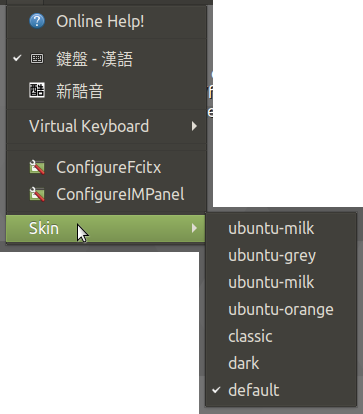
接下來透過 fcitx 的 UI 界面來選取要使用的 skin 設定檔,範例中修改的是 default,所以這邊的 skin 就選取 default:

圖一:選取 fcitx 欲使用的 skin 設定檔,

重新登入、重新開機,就可以套用新的設定了。

Tags:Fcitx, Ubuntu

Lutris 在 Ubuntu 20.04 上啟動失敗

Posted on 2021 年 1 月 16 日2021 年 3 月 12 日 By 日落 在〈Lutris 在 Ubuntu 20.04 上啟動失敗〉中尚無留言

 Lutris 0.5.8 在 Ubuntu 20.04 上啟動時會自動中斷,在 console 底下看到錯誤訊息:

Traceback (most recent call last):
  File "/usr/games/lutris", line 54, in 
    from lutris.gui.application import Application  # pylint: disable=no-name-in-module
  File "/usr/lib/python3/dist-packages/lutris/gui/application.py", line 53, in 
    from .lutriswindow import LutrisWindow
  File "/usr/lib/python3/dist-packages/lutris/gui/lutriswindow.py", line 26, in
    from lutris.gui.widgets.sidebar import LutrisSidebar
  File "/usr/lib/python3/dist-packages/lutris/gui/widgets/sidebar.py", line 6, in
    from lutris import platforms, runners, services
  File "/usr/lib/python3/dist-packages/lutris/platforms.py", line 19, in 
    _init_platforms()
  File "/usr/lib/python3/dist-packages/lutris/platforms.py", line 14, in _init_platforms
    runner = runners.import_runner(runner_name)()
  File "/usr/lib/python3/dist-packages/lutris/runners/wine.py", line 229, in __init__
    "default": dxvk.DXVKManager().version,
  File "/usr/lib/python3/dist-packages/lutris/util/wine/dxvk.py", line 56, in version
    return self.versions[0]
  File "/usr/lib/python3/dist-packages/lutris/util/wine/dxvk.py", line 45, in versions
    self._versions = self.load_dxvk_versions()
  File "/usr/lib/python3/dist-packages/lutris/util/wine/dxvk.py", line 65, in load_dxvk_versions
    with open(versions_path, "r") as dxvk_version_file:
FileNotFoundError: [Errno 2] No such file or directory: '/home/zeroplex/.local/share/lutris/runtime/dxvk/dxvk_versions.json

在 reddit 上面看到有人遇到同樣情況,似乎把設定檔塞到正確位置即可:

$ mkdir -p /home/zeroplex/.local/share/lutris/runtime/dxvk/
$ wget https://cdn.discordapp.com/attachments/538903130704838656/796102070825779250/dxvk_versions.json
$ mv dxvk_versions.json /home/zeroplex/.local/share/lutris/runtime/dxvk/
Tags:Linux, lutris, Ubuntu

使用 single user mode 在 Ubuuntu 修改密碼

Posted on 2020 年 3 月 5 日2021 年 3 月 12 日 By 日落 在〈使用 single user mode 在 Ubuuntu 修改密碼〉中尚無留言

最近記憶有點像是 flash memory,睡個覺什麼都忘了,今天忘記的還是 root 密碼。

Linux 忘記 root 密碼是沒關係的,可以在 console 先進入單人模式以後再重新設定密碼。
第一步:進入開機選單,選「Advance」

第二步:挑其中一個 boot images 並寫按下「e」(edit)

第三步:編輯器往下找,找到一行有「linux    vmlinuz….」來做修改

找到「linux     /vmlinuz-x.x.x  ……..」這行,要在這邊做修改。

要注意的事情有:

  • 要對硬碟做修改,所以要把「ro」(read-only) 改成 「rw」
  • 「init」這個參數要指向 bash,否則會使用 root shel,可以操作的選項少很多

修改後的開機參數應該會向下面這樣:

第四步:調整完畢後,按下 F10 使用新的參啟動 Ubuntu。

這樣就可以使用 root 來改密碼了:「passwd zeroplex」。

備註:若你覺得 grub 選單的停留時間太短很難操作,可以參考「延長 grub menu timeout」來修改。若是卡在 VMware 的 BIOS 開機選單太快,可以閱讀 VMware Knowledge Base 的說明,對 VMX 做修改。

Tags:grub, Linux, Ubuntu, VMware

快速判斷 Ubuntu (或該 distribution) 是否重新開機的方法

Posted on 2019 年 8 月 13 日2021 年 3 月 12 日 By 日落 在〈快速判斷 Ubuntu (或該 distribution) 是否重新開機的方法〉中尚無留言

登入 Ubuntu 時,常會看到最底下會有一行字,提醒你主機是否需要重新開機:

Welcome to Ubuntu 16.04.6 LTS (GNU/Linux 4.4.0-142-generic x86_64)

 * Documentation:  https://help.ubuntu.com
 * Management:     https://landscape.canonical.com
 * Support:        https://ubuntu.com/advantage

0 packages can be updated.
0 updates are security updates.


*** System restart required ***

追了一陣子,才知道判斷的方法非常簡單,只要到 /var/run 目錄下檢查是否有「reboot-required」的檔案即可。

例如:

$ ls /var/run
acpid.pid      crond.reboot         initctl         log          motd.dynamic          resolvconf         snapd.socket  udev
acpid.socket   dbus                 initramfs       lvm          mount                 rsyslogd.pid       sshd          unattended-upgrades.lock
agetty.reload  dhclient.enp0s3.pid  init.upgraded   lvmetad.pid  mysqld                screen             sshd.pid      user
atd.pid        dmeventd-client      irqbalance.pid  lxcfs        network               sendsigs.omit.d    sudo          utmp
blkid          dmeventd-server      iscsid.pid      lxcfs.pid    reboot-required       shm                systemd       uuidd
crond.pid      grub                 lock            mdadm        reboot-required.pkgs  snapd-snap.socket  tmpfiles.d    xtables.lock

就這樣,沒了。

Tags:Ubuntu

文章分頁

上一頁 1 ... 3 4 5 ... 11 下一頁

其他

關於我  (About me)

  文章 RSS Feed

  留言 RSS Feed

Apache AWS Bash C/C++ Docker FreeBSD GCP Git Google Java JavaScript Laravel Linux Microsoft MSSQL MySQL Nginx PHP PHPUnit PostgreSQL Python Qt Raspberry Pi Ubuntu Unix Vim Web Windows XD 作業系統 分享 好站推薦 專題 攝影 新奇搞笑 新聞 旅遊 生活雜記 程式設計 網路架站 網頁設計 資訊學習 資訊安全 遊戲 音樂


創用 CC 授權條款
本著作係採用創用 CC 姓名標示-相同方式分享 4.0 國際 授權條款授權.