Skip to content

Zeroplex 生活隨筆

軟體開發和生活瑣事

小 縮小字型大小。 中 重設字型大小。 大 放大字型大小。

標籤: PHP

CodeIgniter 安裝與設定

Posted on 2012 年 11 月 14 日2021 年 3 月 12 日 By 日落 在〈CodeIgniter 安裝與設定〉中尚無留言
CodeIgniter 安裝與設定

CodeIgniter 是個輕巧的 PHP framework,支援 MVC 架構、詳細的文件、還有外掛可以裝。若是第一次使用 PHP framework,CodeIgniter 會是個不錯的選擇。

安裝

到官方網站的下載頁面把壓縮檔抓回來,解壓縮到網站目錄下:

wget http://codeigniter.com/download.php -O codeigniter.zip
unzip codeigniter -d ~/public_html

Done.

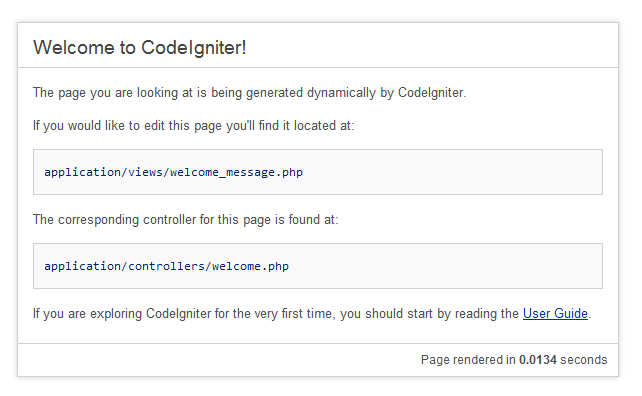
解壓縮完成就可以說是安裝完成,不需要特別設定,打開瀏覽器就能看到歡迎畫面。

在 CodeIgniter 目錄下會看到這幾個檔案。其中 system 目錄就是 CodeIgniter 的核心程式碼,整個 framework 的函式庫、資料庫驅動、類別檔都會在這個目錄。application 則是網站程式的所在位置,未來所要撰寫的程式都會放在這個目錄下。index.php 是網站唯一的進入點,依照設定以及傳入的參數不同,而載入不同的程式執行。

$ tree -L 1 .
.
├── application
├── index.php
├── license.txt
├── system
└── user_guide

因為核心程式與使用者自行撰寫的程式分開,之後若 CodeIgniter 有新的版本,更新時只要替換 system 目錄和 index.php 即可。

設定

CodeIgniter 的設定檔位於 application/config/ 目錄下,按照不同類型分成幾個不同的檔案,以下針對一些較常用的設定做介紹。

config.php

整個 framework 的基本設定,包括網站網址、character set、session encrypt key、log 與快取位置等。如果安裝完畢需要做設定,通常先來看這個設定檔。

database.php

需要連接資料庫時,帳號、密碼會在這個檔案設定。依照 dbdriver 的不同,需要填寫的項目也會不同,不是每個項目都必須填寫,例如使用 sqlite 時,username、password 是不需要填寫的。

route.php

CodeIgniter 有 URI routing 功能,會將 index.php 後方參數對應到 controller 及他的 method。這個設定檔能讓你設定預設要使用的 controller、自訂 routing。

autoload.php

CodeIgniter 中除了 Load、Input 等類別是預設自動載入以外,其他類別、函式、模組都是需要用到時才載入,若希望 CodeIgniter 執行時期自動載入類別或是函式,可以在這個設定檔中做設定。

Tags:CodeIgniter, PHP

Use FuelPHP oil Generate Model and Migration

Posted on 2012 年 11 月 14 日2021 年 3 月 12 日 By 日落 在〈Use FuelPHP oil Generate Model and Migration〉中尚無留言

FuelPHP 的 oil 提供快速建立 model 和 migration 的方法,例如要建立一資料表存放使用者帳號:

oil g model users id:int username:varvhar[100] email:varchar[200]

oil 則會幫你產生 table 的 migration:

<?php

namespace FuelMigrations;

class Create_users
{
   public function up()
   {
      DBUtil::create_table('users', array(
         'id' => array('constraint' => 11, 'type' => 'int'),
         'username' => array('constraint' => 100, 'type' => 'varvhar'),
         'email' => array('constraint' => 200, 'type' => 'varchar'),
         'created_at' => array('constraint' => 11, 'type' => 'int'),
         'updated_at' => array('constraint' => 11, 'type' => 'int'),

      ), array('id'));
   }

   public function down()
   {
      DBUtil::drop_table('users');
   }
}

其中 id 自動被當作 primary key,沒有設定 auto_increment。

若要建立一個資料表,需要有欄位「id」當作 primary key 且設定 auto_increment 屬性,可以將「id」從 oil 參數中去掉,當 oil 偵測到資料表沒有欄位名稱包含 id 且沒辦法設定 primary key 時,便會自動新增一個「id」的欄位:

   public function up()
   {
      DBUtil::create_table('users', array(
         'id' => array('constraint' => 11, 'type' => 'int', 'auto_increment' => true),
         'username' => array('constraint' => 100, 'type' => 'varchar'),
         'email' => array('constraint' => 200, 'type' => 'varchar'),
         'created_at' => array('constraint' => 11, 'type' => 'int'),
         'updated_at' => array('constraint' => 11, 'type' => 'int'),

      ), array('id'));
   }

oil 的參數中很清楚標示欄位的設定為 fieldname:type,沒辦法加入其他欄位屬性。假設要為欄位加上其他屬性,像是 null、index 等,則必須在 oil 產生 migration 以後,手動在 migration 中新增自己需要的屬性。

ps. oil 還會偵測資料表名稱,migration 會將資料表名稱改成複數。

Tags:FuelPHP, PHP

Hook on header and footer

Posted on 2012 年 7 月 18 日2021 年 3 月 12 日 By 日落 在〈Hook on header and footer〉中尚無留言

最近學用 Ajax 處理一些網頁上的事件,javascript 越寫越長,就覺得有必要按照程式碼類別拆成不同檔案,在執行時期決定到底哪些檔案需要匯入。像是管理介面用的 CSS、javascript 就需要在一般頁面當中載入,或是在不需要使用到 Google Maps 時將 javascript API 拿掉。

CodeIgniter 在 controller 與 view 切開後,傳遞資訊只能在 loader 載入時送參數,不過若有多個需要動態載入的資源放在一起,程式寫起來會很麻煩。

// Controller
$data['googleMapAPI'] = true;
$data['jqueryPlugin'] = true;

// View
<?php if( $googleMapAPI == true ): ?>
   <script src=" ..... "></script>
<?php endif; ?>

<?php if( $jqueryPlugin == true ): ?>
   <script src="...."></script>
<?php endif; ?>

這時候想到 WordPress Codex 有個不錯的作法可以參考。Wordpress 為了讓樣板、外掛製作能夠分開、不會互相影響,做出了一個 add_action( ) 的功能,外掛設計師將需要執行的動作「註冊」到系統中,樣板設計師在特定位置呼叫時,系統便會執行已註冊的動作。

// Plugin
<?php
   add_action('wp_head', 'js_include');
   add_action('wp_footer', 'action-on-ready');

   function js-include(){
      echo '<script src="..."></script>';
   }

   function action-on-ready(){
      echo '<script> $('document').ready(); </script> ';
   }
?>

// Template
<html>
<head>
   <titie> .... </title>
   <!-- load script in header -->
   <?php echo wp_head(); ?>
</head>
<body>
   ......
   <!-- load page scripts in footer -->
   <?php wp_footer(); ?>
</body>
</html>

CodeIgniter 有 Hook 類別,不過並沒有 view 的插入點,想試試看能不能把 wordpress add_action( )  功能實作出來。

Tags:PHP, 網頁設計

CodeIgniter 使用心得分享

Posted on 2012 年 6 月 15 日2021 年 3 月 12 日 By 日落 在〈CodeIgniter 使用心得分享〉中尚無留言

以前寫 PHP 時不知道有 framework 可以用,程式從頭到尾都硬幹,每個輪子都自己打造的下場,不外乎就是時間不夠用、事情常常 delay、bug 買一送二越 de 越多 …..。

得知有 PHP frameworks 時,大為欣喜,只是這麼多套 framework 到底應該先挑哪一套當作起步?就怕挑了一個功能太強太複雜的會讓自己一直碰壁、挑了個太冷門的之後換一套 framework 就接近從頭學起。

經朋友介紹,CodeIgniter 該有的基本功能都有了,且不難上手,適合第一次沒用過 framework 的人當作入門。所以最近幾個網頁功能都用 CodeIgniter 當作練習。

最近 C4Labs 朋友在玩  PHP,所以藉機分享一下最近 CodeIgniter 的使用經驗,以及問題、解決方法。以下是投影片,請多指教。

Introduction to codeigniter

View more PowerPoint from Zero Huang

Ref:
CodeIgniter | 小惡魔 – 電腦技術 – 工作筆記 – AppleBOY
http://blog.wu-boy.com/tag/codeigniter/

ps. 沒事不要裝 ion_auth 啊,會讓人嚴重墮落 XD

Tags:CodeIgniter, PHP

XSS Filter on CodeIgniter

Posted on 2012 年 6 月 13 日2021 年 3 月 12 日 By 日落 在〈XSS Filter on CodeIgniter〉中有 2 則留言

過去防止 XSS 攻擊都是透過 htmlspecialchars() 將「<」、「>」等符號編碼,但若是前端有使用 CKEditor 之類工具,文章中的樣式也會全部被洗掉。

最近用 CodeIgniter Input class 提供的 XSS filter 時,無意間發現 filter 不是將所有特殊符號過濾掉,而是經過 parser 以後才決定哪些標籤和屬性需要刪除。

一般常見用來測試 XSS 的字串:

<script>alert(123)</script>

輸出:

[removed]alert(123)[removed]

若是將 javascript 嵌在屬性當中,CodeIgniter 會將標籤留下、屬性刪除:

<a href="#" onclick="alert(123)">test</a>

輸出:

<a >test</a>
Tags:CodeIgniter, PHP, 資訊安全

文章分頁

上一頁 1 ... 19 20 21 ... 27 下一頁

其他

關於我  (About me)

  文章 RSS Feed

  留言 RSS Feed

Apache AWS Bash C/C++ Docker FreeBSD GCP Git Google Java JavaScript Laravel Linux Microsoft MSSQL MySQL Nginx PHP PHPUnit PostgreSQL Python Qt Raspberry Pi Ubuntu Unix Vim Web Windows XD 作業系統 分享 好站推薦 專題 攝影 新奇搞笑 新聞 旅遊 生活雜記 程式設計 網路架站 網頁設計 資訊學習 資訊安全 遊戲 音樂


創用 CC 授權條款
本著作係採用創用 CC 姓名標示-相同方式分享 4.0 國際 授權條款授權.