無意間發現透過 printf 輸出資料時,程式會將資料放在 buffer 中,過一段時間後再一起印出。
int main(){
while(1){
printf(".");
sleep(1);
}
return 0;
}
可以透過 fflush() 強制將 buffer 中的資料輸出:
while(1){
printf(".");
fflush(stdout);
sleep(1);
}
軟體開發和生活瑣事
無意間發現透過 printf 輸出資料時,程式會將資料放在 buffer 中,過一段時間後再一起印出。
int main(){
while(1){
printf(".");
sleep(1);
}
return 0;
}
可以透過 fflush() 強制將 buffer 中的資料輸出:
while(1){
printf(".");
fflush(stdout);
sleep(1);
}
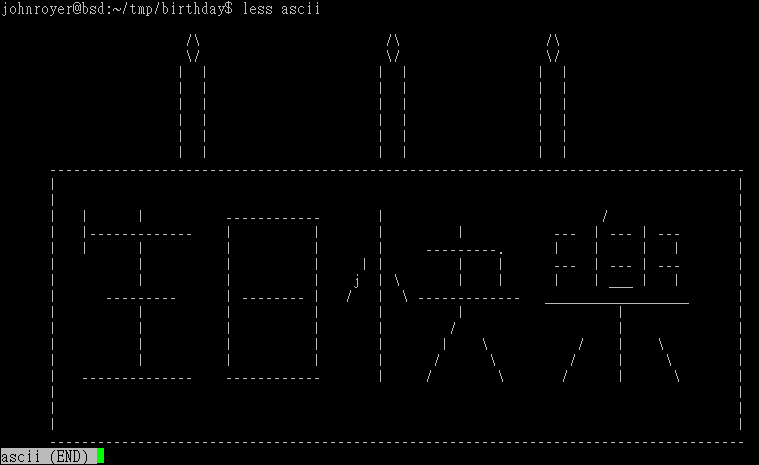
前陣子某 geek 朋友過生日,所以想用程式給他一個小驚喜。原本打算送給他一個假的 patch,讓他在編譯時收到訊息,不過弄半天還是沒搞懂 #pragma 怎麼用,後來改用程式碼混淆的方式製作卡片。
步驟大概如下:
卡片就是 ASCII art 畫一下,看得出來是生日祝賀就好 XD
畫好後,找個方法轉成 C 語言。看了看內容,發現全部都是由「-」、「/」等幾個字元組成,所以要用程式畫出來只要控制要印出的字元以及迴圈次數即可。這時先假設有個函式叫做 pt() ,傳入二個參數,一個是使用的字元,一個是重複次數:
void pt( int ascii, int count ){
int i;
for( i = 0; i < count; i++ ){
printf("%c", ascii);
}
}
按照順序計算字元重複次數以後,就可以把卡片轉換成程式:
#include <stdio.h>
void pt(int ascii, int count){
if( count > 0 ){
printf("%c", ascii);
pt( ascii, count-1 );
}
}
int main(){
pt(10, 1); // n
pt(32, 23); // sapce
pt(47, 1); // "/"
pt(92, 1); // ""
pt(32, 23);
pt(47, 1);
.....
return 0;
}
接下來開始製造大亂。
平常都在找讓程式碼可讀性增加、降低維護成本的方法,反而要倒過來就不太會了,好在之前 CoolShell.cn 上看到一篇文章「如何写出无法维护的代码」,有個方法可以參考。
先來處裡比較簡單的,程式碼中數字只要執行時期表達方式在執行時期的結果相同即可,所以可以把 pt() 參數的數字改成 16 進位,或是用運算式改寫。
pt(0xA, 10+8-17); // n
main() 中 pt() 重複次數太高,即使取代名稱以後看起來還是井然有序。所以複製出多個功能完全一模一樣的函式,並且建立另一個函式專門呼叫 printf。
void pt( int ascii, int count ){
if( count > 0 ){
printChar( ascii );
pt( ascii, count-1 ); // Can call pt2() and other, too
}
} ;
void pt2( int ascii, int count ){ ... } ;
void pt3( int ascii, int count ){ ... } ;
void pt4( int ascii, int count ){ ... } ;
void printChar( int ascii ){
printf("%c", ascii );
}
隨機把 main() 中的函式呼叫名稱換掉以後就差不多夠亂了,最後把變數名稱、函式名稱隨便換一下就大功告成了。
後來看了 IOCCC 和 Just Another Perl Hacker 後,覺得實在還太嫩,以後誰生日再來找其他方法惡搞 XD
後記:
gcc -S 參數可以將 C 語言轉成組合語言:
gcc -S -o code.asm source.c
Javascript 有現成的工具可以玩:aaencode!
初學 jQuery 第一個感想就是 selector 非常好用,加上 effects 功能後,可以說是懶人的一大福音。
在 effects 中有看到 slide down / up,區塊會上下滑動,但沒看到左右滑動的,所以自己試著刻一個。
<style>
#box {
width: 200px;
display: inline;
}
</style>
$('#box').animate( {
width: '0px',
display: 'none'
} , 'slow' };
不過發現 box 不會消失,用開發人員工具去看 display 屬性沒有被改變。後來看了文件才發現是自己耍蠢。
jQuery 建立動畫特效的方式,是依照 duration 以及物件屬性的數字差,並在固定時間間隔對屬性的數值做遞增、遞減,是「數值」遞增、遞減,display 屬性值並非數字,所以 jQuery 沒辦法處理。
ps. 用了 jQuery 以後就不會寫 Javascript 了 …. Orz
用 CodeIgniter 當 framework 時,搞不清楚 .gitignore 要怎麼寫比較好。
後來才知道 Github 上面有個 gitignore 專案,已經整理了不少預設設定檔供參考,從 C/C++、Java、Objective-C 到常用的程式架構如 Android、CodeIgniter、CakePHP、Wordpress 等,直接複製貼上就可以用了,非常方便。
以 Qt Creator 預設的 GUI Appplication 為例:
zero@zero-desktop:~/dev$ tree example/
example/
|-- example.pro
|-- main.cpp
|-- mainwindow.cpp
|-- mainwindow.h
`-- mainwindow.ui
建立 CMakeLists.txt,先寫入最常用到的幾個設定:
project( example )
cmake_minimum_required(VERSION 2.6)
set( SRC main.cpp mainwindow.cpp )
set( HEADER mainwindow.h )
讓 cmake 先載入 Qt 會用到參數:
find_package( Qt4 REQUIRED )
加入 Qt 函式庫位置:
include( ${QT_USE_FILE} )
add_definitions( ${QT_DEFINITIONS} )
因為 Qt 在編譯前會先透過 moc、uic 等對程式做處理,將 SIGNAL/SLOT、ui 轉成程式碼再做編譯。Cmake 透過 wrapper 做設定:
set( FORM mainwindow.ui )
qt4_wrap_cpp( HEADER_MOC ${HEADER} )
qt4_wrap_ui( FORM_HEADER ${FORM} )
如果專案中有使用到 qrc 檔,則需加入:
qt4_add_resources( RESOURCES_RCC resource.qrc )
有時編譯位置與程式碼放置位置不同,編譯器會讀不到 moc 轉出來的程式碼,所以要將編譯位置加入:
include_directories( ${CMAKE_CURRENT_BINARY_DIR} )
最後,編譯設定:
add_executable( exe ${SRC} ${HEADER_MOC} ${FORM_HEADER} )
target_link_libraries( exe ${QT_LIBRARIES} )
完整的 CMakeLists.txt 大致上長這樣:
project( example )
cmake_minimum_required(VERSION 2.6)
find_package( Qt4 REQUIRED )
include( ${QT_USE_FILE} )
add_definitions( ${QT_DEFINITIONS} )
set( SRC main.cpp mainwindow.cpp )
set( HEADER mainwindow.h )
set( FORM mainwindow.ui )
qt4_wrap_cpp( HEADER_MOC ${HEADER} )
qt4_wrap_ui( FORM_HEADER ${FORM} )
include_directories( ${CMAKE_CURRENT_BINARY_DIR} )
add_executable( exe ${SRC} ${HEADER_MOC} ${FORM_HEADER} )
target_link_libraries( exe ${QT_LIBRARIES} )
建立 Makefile:
zero@zero-desktop:~/dev/example$ mkdir build
zero@zero-desktop:~/dev/example$ cd build/
zero@zero-desktop:~/dev/example/build$ cmake ..
-- The C compiler identification is GNU
-- The CXX compiler identification is GNU
-- Check for working C compiler: /usr/bin/gcc
-- Check for working C compiler: /usr/bin/gcc -- works
-- Detecting C compiler ABI info
-- Detecting C compiler ABI info - done
-- Check for working CXX compiler: /usr/bin/c++
-- Check for working CXX compiler: /usr/bin/c++ -- works
-- Detecting CXX compiler ABI info
-- Detecting CXX compiler ABI info - done
-- Looking for Q_WS_X11
-- Looking for Q_WS_X11 - found
-- Looking for Q_WS_WIN
-- Looking for Q_WS_WIN - not found.
-- Looking for Q_WS_QWS
-- Looking for Q_WS_QWS - not found.
-- Looking for Q_WS_MAC
-- Looking for Q_WS_MAC - not found.
-- Found Qt-Version 4.6.2 (using /usr/bin/qmake)
-- Looking for _POSIX_TIMERS
-- Looking for _POSIX_TIMERS - found
-- Configuring done
-- Generating done
-- Build files have been written to: /home/zero/dev/example/build
沒有錯誤訊息的話,目錄下應該就會有 Makefile 了,接下來 make 吧!

Reference:
Using CMake to Build Qt Projects | Qt Developer Network
http://qt-project.org/quarterly/view/using_cmake_to_build_qt_projects
「 」: CMake to QMake note
https://b2.zeroplex.tw/2009/12/cmake-to-qmake-note.html